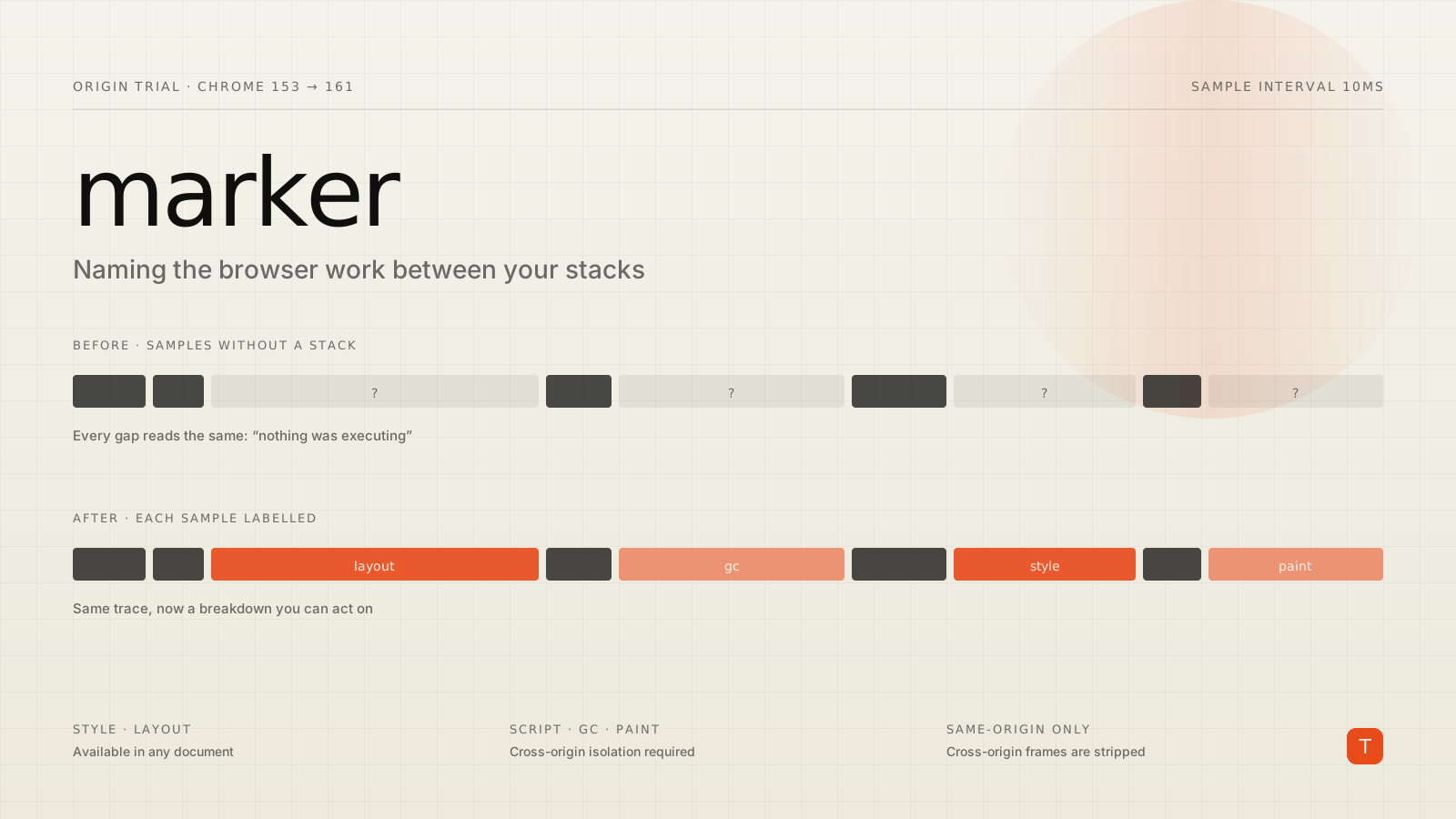
If you have ever shipped the JavaScript Self-Profiling API to production, you know the frustrating part. A user has a 900ms interaction. You pull the profile. Two hundred milliseconds of it is your code, clearly attributed, function by function. The other seven hundred is nothing — samples with no stackId, which the format says means "nothing was executing."
Except something obviously was. The browser was recalculating style, doing layout, painting, or pausing for garbage collection. The profiler just had no vocabulary for saying so.
Chrome 153 opens an origin trial for JS Self-Profiling Markers, which gives it that vocabulary. Each sample gains an optional marker field naming what the engine was doing: script, gc, style, layout, paint, or other.
A quick refresher on the API
The JavaScript Self-Profiling API is a sampling profiler you can start from page JavaScript, on real user devices. It is the same profiler that backs the DevTools Performance panel, exposed to the page.
You enable it with a document policy on the HTML response:
Document-Policy: js-profiling
Then you construct a profiler, do work, and stop it:
if (typeof window.Profiler === 'function') {
  const profiler = new Profiler({ sampleInterval: 10, maxBufferSize: 10000 });

  // ... application work ...

  const trace = await profiler.stop();
  beacon(trace);
}
The returned trace is four parallel arrays — frames, resources, stacks, and samples — where each sample carries a timestamp and a stackId that you resolve back through the stack tree. Nic Jansma's JS Self-Profiling API In Practice remains the best field guide to the format, the beaconing, and the overhead. His measured traces averaged about 25 KB when profiling from page start through five seconds past load.
The API is not new — Chrome has shipped it since version 94. What has never worked is attributing the silence.
What markers change
The markers explainer adds one optional field per sample. Nothing else about the API changes:
"samples": [
  { "timestamp": 100, "stackId": 2, "marker": "script" },
  { "timestamp": 110, "stackId": 2, "marker": "gc" },
  { "timestamp": 120, "stackId": 3, "marker": "layout" },
  { "timestamp": 130, "stackId": 2, "marker": "script" }
]
That is the whole API surface. If you already parse traces, you read one more key. If you do not read it, nothing breaks — a missing marker is interpreted exactly as it is today: idle or unknown.
The value is entirely in what it lets you conclude. A trace where 60% of samples during a slow interaction are marked layout is a different engineering problem from one where 60% are marked gc, which is different again from one where the samples carry your own stacks under script. Today all three look identical in a field profile: a wall of blank samples between two thin slices of your code. You end up guessing, or you try to reproduce locally on hardware nothing like the user's.
The isolation split is the catch
Read this part before you plan a rollout, because it is the detail most likely to surprise you.
Markers are graduated. Per the Intent to Experiment discussion on blink-dev, script, gc, and paint are gated behind cross-origin isolation — COOP same-origin plus COEP require-corp. Only style and layout are exposed in non-isolated documents.
The reasoning is a side-channel argument rather than an arbitrary restriction. Garbage collection is not attributable to a single origin, and paint timing could act as a proxy for the render time of cross-origin opaque resources that fail a Timing-Allow-Origin check. In a cross-origin-isolated process, a document can already observe process-wide signals under the Spectre threat model, so those markers add no new leverage. Style and layout are exposed everywhere because their timing is already same-origin observable through forced reflow — call getBoundingClientRect() or getComputedStyle() and time it.
Two more constraints from the same thread, both worth writing into your analysis code:
- Markers attach only when the responsible document is same-origin with the profiler. Cross-origin frames are stripped.
- Markers add attribution, not resolution. They reuse the document's existing
performance.now()time origin, and the profiler still produces at most one sample every 10ms (16ms on Windows). A requestedsampleIntervalis snapped up to that base interval.
So the same profiling code yields different marker sets depending on whether you managed to deploy cross-origin isolation. For most large applications with third-party scripts, that is not a small if. The practical read: plan for style and layout as your baseline, and treat script/gc/paint as a bonus you unlock if and when isolation lands.
Where this pays off
The obvious pairing is INP. You already know which interactions are slow from Event Timing, and Long Animation Frames tells you which frame was long. What neither tells you, at the resolution you want, is what the browser was busy with inside that window on that user's device.
If you keep a profiler running and slice it against Event Timing entries, markers turn the slice into a breakdown:
let profiler = new Profiler({ sampleInterval: 10, maxBufferSize: 10000 });

new PerformanceObserver((list) => {
  for (const entry of list.getEntries()) {
    if (entry.duration < 200 || profiler.stopped) continue;

    profiler.stop().then((trace) => {
      const inWindow = trace.samples.filter(
        (s) => s.timestamp >= entry.startTime && s.timestamp <= entry.startTime + entry.duration
      );

      const breakdown = {};
      for (const s of inWindow) {
        const key = s.marker ?? 'unknown';
        breakdown[key] = (breakdown[key] ?? 0) + 1;
      }

      beacon({ name: entry.name, duration: entry.duration, breakdown });
      profiler = new Profiler({ sampleInterval: 10, maxBufferSize: 10000 });
    });
  }
}).observe({ type: 'event', buffered: true });
Note what this beacons: a small histogram, not a 25 KB trace. Counting markers per sample bucket and shipping the counts is a far cheaper aggregation than uploading full profiles from every sampled session, and for the "is this rendering or is this our code" question it is usually enough. Multiply the count by the reported profiler.sampleInterval if you want rough milliseconds — rough being the operative word, since sampled profilers over- and under-report short functions by design.
Google lists Excel Online and Datadog as trial partners, the latter consuming self-profiling data in its RUM product. That is a reasonable signal about where this lands first: the analysis is only worth building if you are aggregating profiles across many sessions, which in practice means a RUM vendor or a large first-party application with its own pipeline.
Caveats that have not gone away
Markers do not fix the API's existing sharp edges, and it is worth restating them before anyone plans a quarter around this.
Cross-origin scripts vanish entirely. Any cross-origin JavaScript in a stack has its frame removed, with no indication that removal happened, unless the script is served with Access-Control-Allow-Origin and loaded with crossorigin="anonymous". Stacks can therefore be actively misleading, not merely incomplete.
Minified names are what you get. Plan on source-mapping frames server-side.
You cannot beacon from unload. stop() returns a promise, so profiles have to be flushed at intervals or on visibilitychange, never in a teardown handler.
Sampling is best-effort. The explainer is explicit that markers are sampled annotations attached on a best-effort basis, and must not be relied on for correctness. They are a debugging aid, not a metric you page on.
What to do this quarter
The trial runs from Chrome 153 to Chrome 161 — 16 weeks, which under the new two-week release cadence is only eight milestones. Registration and shipping decisions will move faster than the four-week cycle trained everyone to expect.
Concretely:
- If you are not self-profiling at all, this is not your entry point. Start with Event Timing and Long Animation Frames, which are interoperable and need no origin trial.
- If you already collect profiles, adding
s.markerto your parser is a one-line change that degrades safely. Do it before you register, so trial traffic produces usable data on day one. - Check your isolation status now. Whether you get two markers or five depends on COOP/COEP, and that is a much bigger project than reading a new field. Knowing the answer changes what you can promise stakeholders.
- Test behind the flag first with
--enable-blink-features=ExperimentalJSProfilerMarkersrather than burning trial time on integration bugs.
The spec is still a WICG pull request with a TAG review pending and no signals yet from Gecko or WebKit. Treat this as Chrome-only diagnostics that make your existing field traces legible — not as a cross-browser capability to build a product on.