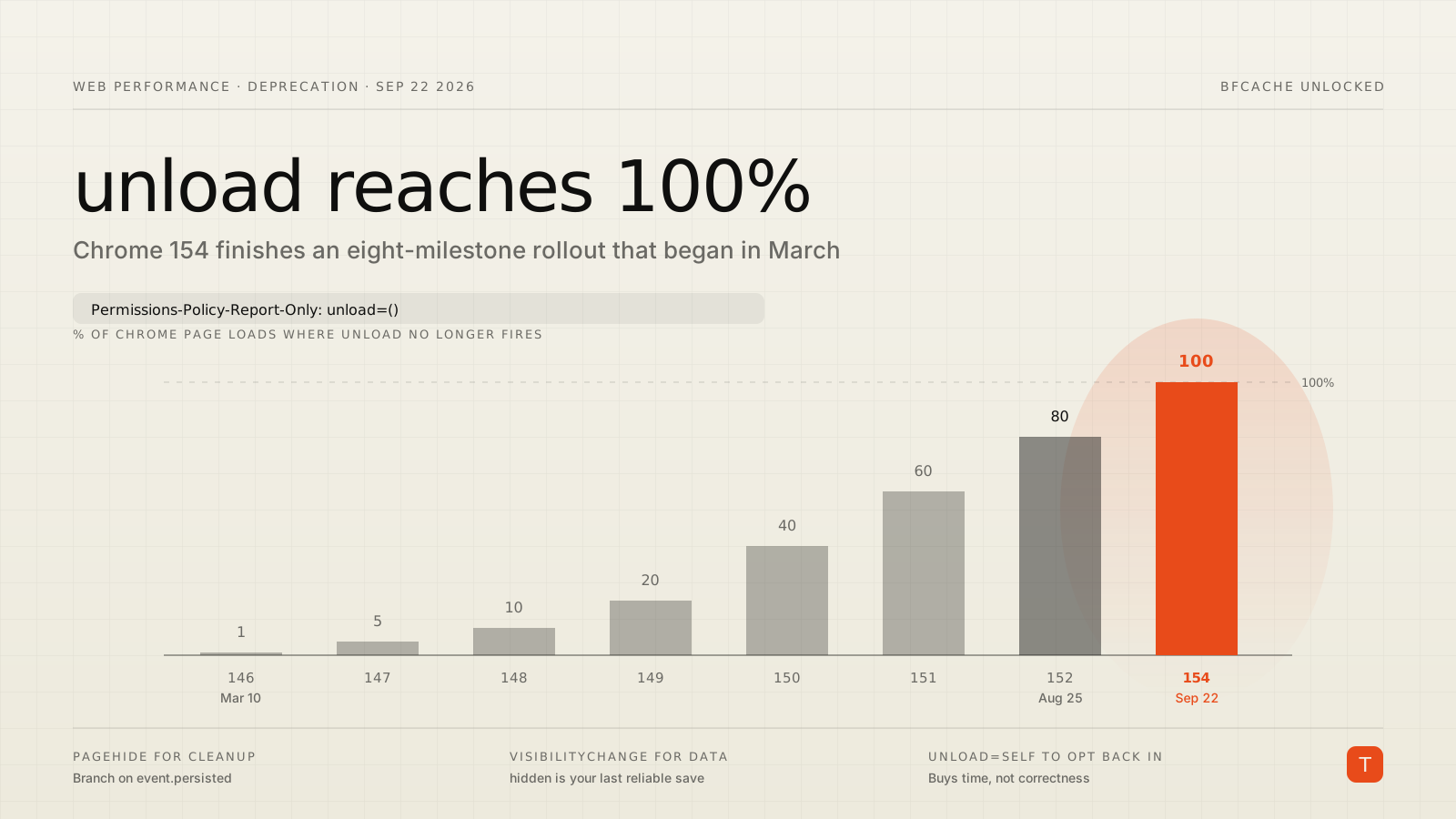
The unload event has been on death row since 2019. On September 22, 2026, Chrome 154 carries out the sentence: unload handlers stop firing on 100% of page loads unless a page explicitly opts back in with a Permissions Policy header.
If you have been tracking this, the number will not surprise you — Chrome has been ramping since March, and as of Chrome 152 (August 25) the deprecation already applies to 80% of page loads. If you have not been tracking it, you have about three weeks, and the odds are decent that something in your dependency tree still registers an unload listener.
Here is what actually changes, how to find your handlers, and what to do with them.
The rollout schedule, in numbers
Chrome's deprecation timeline rolled the change out to all origins across eight milestones in 2026:
| Milestone | Date | % of Chrome page loads |
|---|---|---|
| 146 | Mar 10, 2026 | 1 |
| 147 | Apr 7, 2026 | 5 |
| 148 | May 5, 2026 | 10 |
| 149 | Jun 2, 2026 | 20 |
| 150 | Jun 30, 2026 | 40 |
| 151 | Jul 28, 2026 | 60 |
| 152 | Aug 25, 2026 | 80 |
| 154 | Sep 22, 2026 | 100 |
Two details matter for how you debug this. First, the rollout is keyed on a combined hash of user and site, not on random page loads and not on whole sites. That was a deliberate choice: random selection would produce bugs nobody can reproduce, and per-site selection would break a fraction of the web all at once. The practical consequence is that a given user sees consistent behavior on a given site — so "it works on my machine" is a real and reproducible state, not a fluke.
Second, Chrome notes that milestone numbers and dates remain subject to change as it assesses impact. Microsoft publishes its own schedule for the same Chromium change: Edge 152 release notes put Edge at 60% of page loads, rising to 80% in Edge 154 and 100% in Edge 155. Same destination, slightly later arrival.
Why the platform is doing this
The short version: unload is unreliable everywhere, and where it is reliable, it costs you the back/forward cache.
The reliability numbers are worth internalizing. Per the deprecation explainer, unload handlers run 95%+ of the time on desktop Chrome, Edge, and Firefox — but only 57–68% on mobile browsers and on desktop Safari, which already prioritize bfcache over running the handler. Safari, which matches the HTML spec here, runs unload roughly 58% of the time.
Worse than the miss rate is the bias in the miss rate. Whether unload fires depends on whether the page is bfcache-eligible, which in turn depends on what every frame on the page is doing — including third-party iframes you do not control. So the analytics you lose are not a random sample. You may be systematically missing sessions where a particular ad network's frame loaded, or where the user took a particular action. That is not data you can correct for with a fudge factor.
And on desktop Chrome and Firefox, the 95% reliability is purchased by disabling bfcache for the page entirely. That is a direct, measurable hit to back and forward navigation, which is a meaningful share of real traffic. The explainer notes unload appears in over 30% of all potentially bfcacheable navigations — a lot of instant back-navigations being traded for a beacon that fires most of the time.
Finding your handlers
You have three detection paths, in increasing order of effort and coverage.
DevTools, for a spot check. Open Application → Background services → Back/forward cache and click Test back/forward cache. Chrome navigates away and back, then lists anything that blocked eligibility. An unload listener shows up under Actionable.
notRestoredReasons, for field data. The PerformanceNavigationTiming entry exposes why a document was not restored from bfcache, including which frame was responsible:
new PerformanceObserver((list) => {
  for (const entry of list.getEntries()) {
    const nrr = entry.notRestoredReasons;
    if (!nrr) continue;
    const reasons = nrr.reasons?.map((r) => r.reason) ?? [];
    if (reasons.includes('unload-listener')) {
      // Report entry.name / nrr.url — this tells you which frame, not just that
      // something on the page is holding you back.
      sendToAnalytics({ metric: 'bfcache-blocked', reasons, url: nrr.url });
    }
  }
}).observe({ type: 'navigation', buffered: true });
Permissions Policy reporting, for the full inventory. This is the one to reach for if you have third-party scripts, tag managers, or a large team. Ship a report-only header and collect violations without changing behavior:
Permissions-Policy-Report-Only: unload=()
Report-To: {"group":"default","max_age":1800,"endpoints":[{"url":"https://example.com/report"}],"include_subdomains":true}
Every attempt to register an unload listener now shows up at your endpoint, attributed to a document. Run this for a week before you touch any code.
What to replace them with
Most unload handlers fall into one of three buckets, and each has a better answer.
Sending analytics or session-end beacons. Use visibilitychange and treat the hidden state as your last reliable moment to persist anything. It fires on tab switches, minimizes, and app backgrounding — the cases where unload silently never runs.
document.addEventListener('visibilitychange', () => {
  if (document.visibilityState === 'hidden') {
    navigator.sendBeacon('/analytics', JSON.stringify(payload));
  }
});
sendBeacon is the right primitive here because it survives document teardown. fetch(url, { keepalive: true }) works too when you need headers or a response.
Cleaning up resources on navigation. Use pagehide, and branch on persisted:
window.addEventListener('pagehide', (event) => {
  if (event.persisted) {
    // Going into bfcache. The document may come back — release nothing you
    // cannot cheaply rebuild, and restore it in `pageshow`.
  } else {
    // Actually being destroyed. This is the `unload` equivalent.
  }
});
Critically, pagehide does not make the page bfcache-ineligible. That is the whole point: you get the callback and you keep instant back-navigation.
Warning about unsaved changes. That is beforeunload, a different (cancellable) event, and it is not part of this deprecation. It is still worth auditing: beforeunload also blocks bfcache while registered, so add the listener only when there is genuinely unsaved state and remove it as soon as the form is clean.
There is one genuinely hard case. If you use MessageChannel to talk between cross-origin documents and rely on unload to signal teardown, pagehide covers you for subframes, but a top-level document entering bfcache may later be destroyed with no further events. The explainer's recommendation is to hold the port in a WeakRef on the receiving side and treat collection as the close signal.
The escape hatch, and when to use it
If you cannot finish the migration in three weeks, you can opt back in. For a top-level document:
Permissions-Policy: unload=self
Subframes are more involved: the header must be present on the subframe and every ancestor, and every containing <iframe> needs allow="unload". For a cross-origin child, the top-level header needs to name it explicitly:
Permissions-Policy: unload=(self "https://b.example")
Enterprises with internal software that depends on unload can use the ForcePermissionPolicyUnloadDefaultEnabled policy to hold the old default across managed devices. Chrome says it plans to support both opt-outs for the considerable future.
But treat these as a schedule extension, not a decision. Opting back in restores the status quo — which is a handler that still fails to run roughly a third of the time on mobile, and still costs you bfcache on desktop. You are buying time, not correctness.
What to do this month
- Ship
Permissions-Policy-Report-Only: unload=()today. It is one header, it changes nothing, and it gives you the actual inventory rather than a guess. - Check your third parties, not just your code. Analytics SDKs, chat widgets, and older tag manager templates are where these hide.
- Migrate to
visibilitychange+sendBeaconfor data,pagehidefor cleanup. Both are better than what you had, independent of the deprecation. - Measure the upside. Once the handlers are gone, watch your bfcache hit rate and your back-navigation timings. This deprecation is usually a performance win disguised as a breaking change.
- If you need the opt-out, set a removal date when you set the header. Otherwise it becomes permanent by default.
The deadline is real, but the work is small — and unlike most forced migrations, the thing you are migrating to is faster than the thing you are leaving behind.